
Check NTN details and FBR taxpayer status
An NTN or profile check identifies the taxpayer. Income-tax active status and sales-tax active status are separate checks. Choose the result your business needs.
Choose the right FBR check
| You need to know | Use this service |
|---|---|
| Who the registration belongs to | Taxpayer Profile Inquiry |
| Whether the taxpayer is on the income-tax active list | Active Taxpayer List (Income Tax) |
| Whether the taxpayer has the relevant sales-tax active status | Active Taxpayer List (Sales Tax) |
| Whether an invoice was reported | The invoice verification service for its authority |
Do not use an income-tax ATL result as a substitute for sales-tax status. A matching registration number is also not proof that a particular invoice was accepted.
Open Online Verifications on IRIS
Open official IRIS verification services iris.fbr.gov.pk
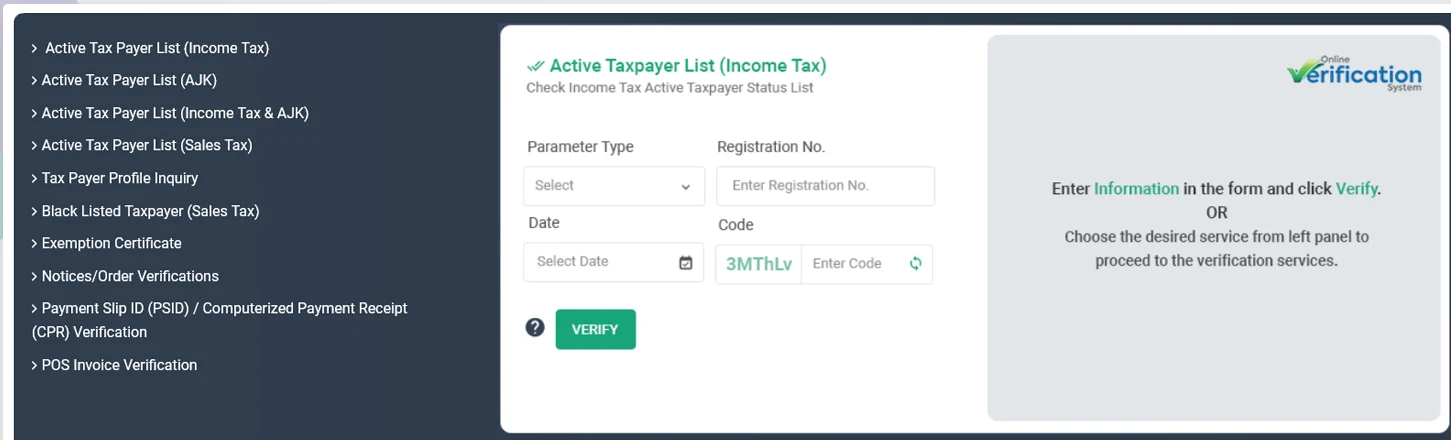
- Choose the required service under Online Verifications.
- Select the identification type offered by the form, such as CNIC or NTN.
- Enter the requested registration details, date where applicable, and captcha on the official page.
- Run the check and compare the displayed taxpayer name and result with your records.
Checking a customer or supplier
- Match the taxpayer’s name and registration details, not just the number on an invoice.
- Use the tax-specific active list relevant to the transaction.
- Retain the result and the date of your check with the business record.
- Ask the customer or supplier to clarify differences before relying on the details.
If you use a downloadable list, check the publication/update date on the official source. A saved list may no longer reflect current status.
- FBR Online Verification Services e.fbr.gov.pk
- Official sales-tax Active Taxpayer List downloads fbr.gov.pk
Need to check an invoice instead?
Start with the authority printed on the receipt. FBR POS, digital invoices and provincial receipts do not all use the same verification process.
What the result does not decide
A registration or active-list result does not decide every tax treatment, exemption or input-tax claim. Use the applicable transaction requirements alongside the taxpayer check, and keep the invoice and supporting records.